Customer-Facing Display
Every Transaction, Face to Face
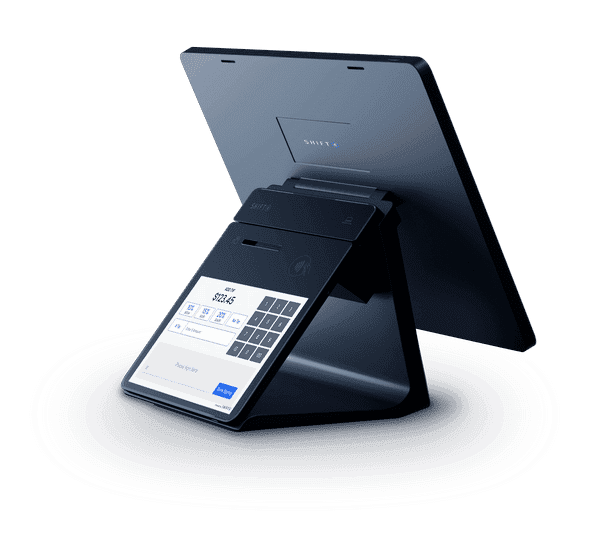
7" customer-facing display for order accuracy, higher tips, and loyalty signups, right at the counter.
What the Customer Sees
Three screens, one seamless flow from order review to payment.
ORDER REVIEW
Order Review
Guests verify items & total
SELECT TIP
Tip Selection
Preset % with default highlight
TAP, DIP, OR SWIPE
Total: $40.53
(incl. 20% tip)
Payment
Tap, dip, or swipe to pay
ORDER REVIEW
Order Review
SELECT TIP
18%
$6.08
20%
$6.76
25%
$8.44
Custom Amount
Tip Selection
TAP, DIP, OR SWIPE
Total: $40.53
(incl. 20% tip)
Payment
Higher Tips, Automatically
On-screen tip presets consistently outperform paper-signed receipts.
Traditional POS
15-16%
Average tip rate
Shift4 Dine Customer Display
18-22%
Average tip rate
+3 to 6 percentage points in tips
Pre-set tip suggestions on-screen lead to consistently higher tip rates compared to writing in tips on a paper receipt.
The Customer Experience
Five steps from idle to complete, all on a 7" touchscreen.
Idle / Branded Screen
- Displays custom splash image (upload at Lighthouse > Devices > Customer Display)
- Recommended image: 1280 × 800 pixels
- Show your logo, daily specials, promotions, or marketing messages
- Updates instantly when saved
Order Review
- Customer sees itemized order as cashier enters it, prices and running total in real-time
- Custom ordering screen image (640 × 800 pixels)
- Reduces "what did I order?" confusion and disputes
- Supports cash vs. credit dual pricing display (Advantage Program)
Loyalty Prompt
- Customer enters phone number to sign in or register for loyalty
- Sees loyalty points earned after entry
- Configured at: Manager > Settings > Business > Loyalty
- Limitation: CFD can track/display points only. Cannot apply loyalty discounts. Customers must redeem on POS terminal, Glass, or Mobile.
Payment
- Customer swipes, dips, or taps their card directly on the display
- Supports: EMV chip, NFC contactless, magnetic stripe
- Apple Pay and Google Pay
- Secured by tokenization and PCI-validated point-to-point encryption
Tip Screen
- Up to 3 preset percentages (e.g., 18%, 20%, 25%)
- Optional: pre-select a default percentage with "Continue" button
- "Allow No Tip" toggle (shows/hides the No Tip button)
- Custom Tip amount always available
- Tips are percentage-based only, no flat dollar amounts
- Max Tip Percentage Limit prevents adjustments above threshold (requires manager PIN)
Configure It Your Way
Three settings areas control your tip experience.
| Setting | Location | What It Does |
|---|---|---|
| Prompt for Tips | Manager > Hardware > Payment Devices | Master ON/OFF switch |
| Tip Hints (3 %) | Manager > Hardware > Printers/KDS > [receipt printer] | Sets the 3 percentage options (set to 0 to hide) |
| Default Tip | Same as above | Pre-selects one option with "Continue" button (requires CFD v2.9+) |
| Allow No Tip | Manager > Hardware > Customer Display | Shows/hides "No Tip" button (requires CFD v2.6+) |
Recommended Tip Setups by Venue
| Venue | Percentages | Default? | Allow No Tip? |
|---|---|---|---|
| Bar | 20% / 25% / 30% | Yes (25%) | Yes (speed matters) |
| Counter / QSR | 15% / 18% / 20% | No | Yes (should feel optional) |
| Full-Service | 18% / 20% / 25% | Optional | Yes |
Branding & Customization
- Configure at: Lighthouse Business Manager > Devices > Customer Display
- Upload splash screen (idle): 1280 × 800 px recommended
- Upload ordering screen: 640 × 800 px recommended
- Built-in crop/resize/rotation tools
- Splash screen updates instantly; ordering screen updates on next sync
How It Connects
Mounts directly on the Shift4 Dine Workstation base via POGO PIN connector or USB-C.
Customer Display
7" HD Touchscreen
Hardware Specs
PAX A3700 (Elys Tablet 7)
- Model
- PAX A3700 (Elys Tablet 7)
- Display
- 7" IPS HD touchscreen (1280 × 800)
- Processor
- Octa-Core 1.8 GHz
- RAM
- 2 GB
- Storage
- 16 GB Flash
- OS
- Android 11
- Wi-Fi
- Dual-band (2.4 GHz / 5 GHz)
- Bluetooth
- 5.0
- Connectivity
- USB-C, POGO pins
- Dimensions
- 7.36"H × 6.94"W × 1.88"D
- Weight
- 1.73 lbs
- Payments
- Chip & PIN, Magnetic Stripe, Contactless
- Mobile Wallets
- Apple Pay, Google Pay
- Operating Temp
- -10°C to 45°C (14°F to 113°F)
- Min POS Version
- Shift4 Dine POS v1.78.3
Best For
Pricing
$0
upfront for hardware
$29.99
/month (included with workstation)
Frequently Asked Questions
Ready to boost tips and accuracy?
See the customer-facing display in action with a free demo.