Shift4 Dine Kiosk · Self-Service Ordering
Let Customers Order on Their Terms
14" touchscreen kiosk: self-service ordering that flows straight to your kitchen.
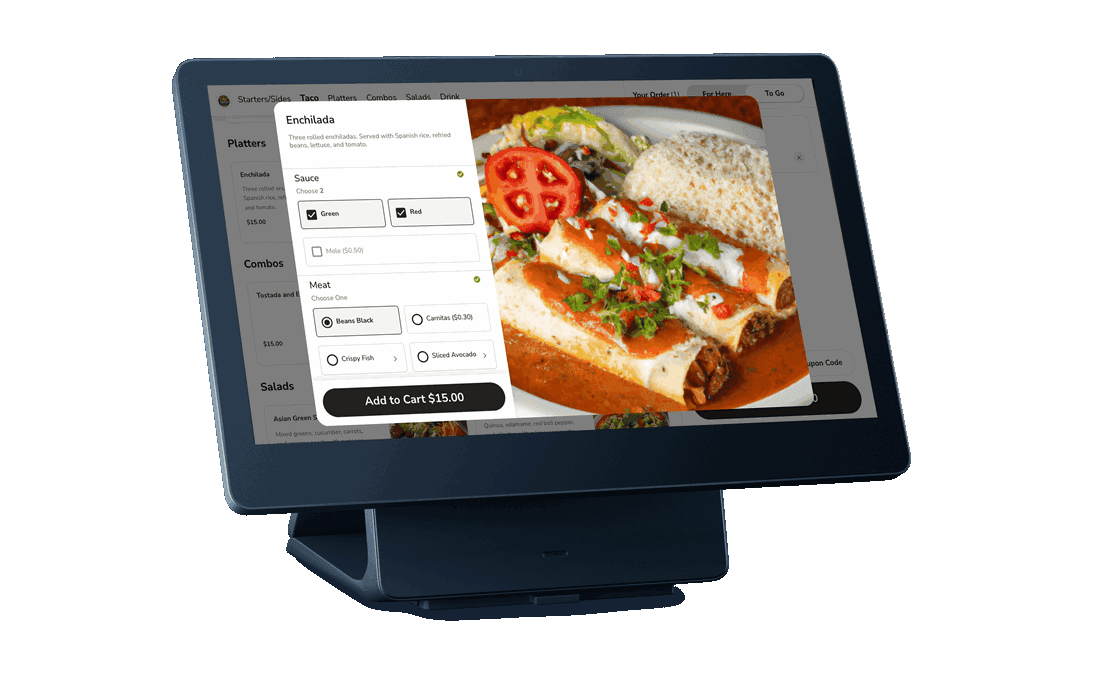
The Kiosk Experience
From welcome screen to payment in four intuitive steps.
Welcome
Guest approaches and taps to start ordering
Menu
Browse categories with item images and descriptions
Customize
Add modifiers, special requests, and extras
Pay
Tap, insert, or swipe. Apple Pay & Google Pay accepted.
The Customer Journey
Six steps from approach to pickup, all on a single screen.
Browse
- Customer approaches kiosk and views menu on 14" touchscreen
- Step-by-step ordering prompts guide them through categories
- Images for every item (kiosk is visual-first)
- Menu Availability feature controls which items show by time of day
Customize
- Select items, add modifiers (standard modifier sets)
- Pre-Modifiers (NO/EXTRA/SUB) do NOT appear on kiosks: use standard modifier sets
- Smart defaults and clear options reduce decision fatigue
Order
- Review order summary with all items, modifiers, and totals
- Set order type: Dine In or Pickup (configurable via Order Flows)
- "Order Again" feature: returning customers reorder past favorites via phone number
Pay
- PAX A35 PIN Pad: EMV chip, NFC tap, magnetic swipe
- Apple Pay, Google Pay accepted
- Secure: tokenization + PCI-validated point-to-point encryption
Tip
- Configurable tip presets (merchant sets percentages)
- Allow No Tip option
- Allow Custom Tip option
- Tips assigned to active user when order is marked Complete
Receive
- E-receipt sent digitally (captures customer contact info + feedback)
- SMS notification when order is ready
- Staff confirms name + order number at pickup
Behind the Scenes
How kiosk orders flow through your operation.
- Orders flow directly into Shift4 Dine POS, appear in Completed tab
- Kitchen receives orders on KDS or kitchen printer instantly
- Staff can view items ordered, customer details, special instructions
- Staff can send SMS notifications from POS when order is ready
- Manager can void kiosk orders from POS (requires authorized permissions)
- Kiosk uses the Online Menu from Menu Manager (not the standard POS menu)
- Configured through Lighthouse Business Manager > Marketplace > Shift4 Dine Kiosk
The Kiosk ROI
Real operational impact from day one.
15-30%
Higher Average Checks
Kiosks encourage upselling through smart prompts and visual menus
1 Fewer
Counter Staff Needed
Redirect labor from order-taking to food prep and guest experience
$0
Upfront Cost
Hardware included with your $29.99/month subscription. No capital outlay.
Hardware Specs
PAX Elys Workstation L1400 platform
- Display
- 14" FHD Touchscreen (1920 × 1080)
- Processor
- Qualcomm Octa-Core 2.0 GHz
- RAM
- 4 GB
- Storage
- 64 GB Flash
- OS
- Android 11
- Body
- Aluminum alloy, < 0.5" thick
- Camera
- 5 MP auto-focus front
- Wi-Fi
- Dual-band (2.4 GHz / 5 GHz)
- Bluetooth
- 5.0
- Ports
- 2× USB-C (bottom of base)
- Payment Device
- PAX A35 PIN Pad (separate stand, adhesive mount)
- Payments
- EMV chip, NFC tap, Apple Pay, Google Pay, magnetic swipe
- Form Factor
- Free-standing or counter-mounted
- Platform
- PAX Elys Workstation L1400
Additional Features
Barcode Scanning Self-Checkout
Available on single-menu kiosks with compatible Zebra USB scanner
Order Flows
Configure multiple order types (Pickup, Dine In) with custom questions, messages, and item restrictions
Loyalty Integration
Phone number entry for loyalty program signup and points tracking
Manager Controls
Enable/disable kiosk remotely; daily operations checklist (start of day, during service, end of day)
Where Kiosks Work Best
Self-service ordering thrives in high-volume, high-customization environments.
Coffee Shops
2x faster ordering
Speed up the morning rush. Let regulars skip the line and reorder favorites.
Pizzerias & QSR
Higher ticket sizes
Visual menus boost upsells. Customers build their own pizza without slowing down staff.
Fast Casual
Fewer order errors
Customization-heavy menus work beautifully on a touchscreen. Modifiers are clear and visual.
Concessions & Stadiums
Massive throughput
High-volume, simple menus. Process hundreds of orders per hour with minimal staff.
Food Courts
Zero line bottlenecks
Multiple kiosks handle peak traffic. Orders route to the right kitchen automatically.
Late-Night & Bars
Revenue during peak
Self-service food ordering during rushes when staff is focused on drinks.
Best For
Available in United States, Ireland, and United Kingdom
Pricing
$0
upfront for hardware
$29.99
/month per kiosk
Frequently Asked Questions
Ready to add self-service ordering?
See Shift4 Dine Kiosk in action with a free demo tailored to your restaurant.